Free-text reasons and solving without reasons
In every task's settings, under How students work, two options change how students write the reasons in a proof:
- Type reasons as free text: students type each reason in their own words instead of choosing it from the list of reasons.
- Allow solution without reasons: students can leave steps without a reason, and lose no points for it.
You can choose one of them or neither, but not both: ticking one clears the other. Both work in practice tasks and in quiz mode.
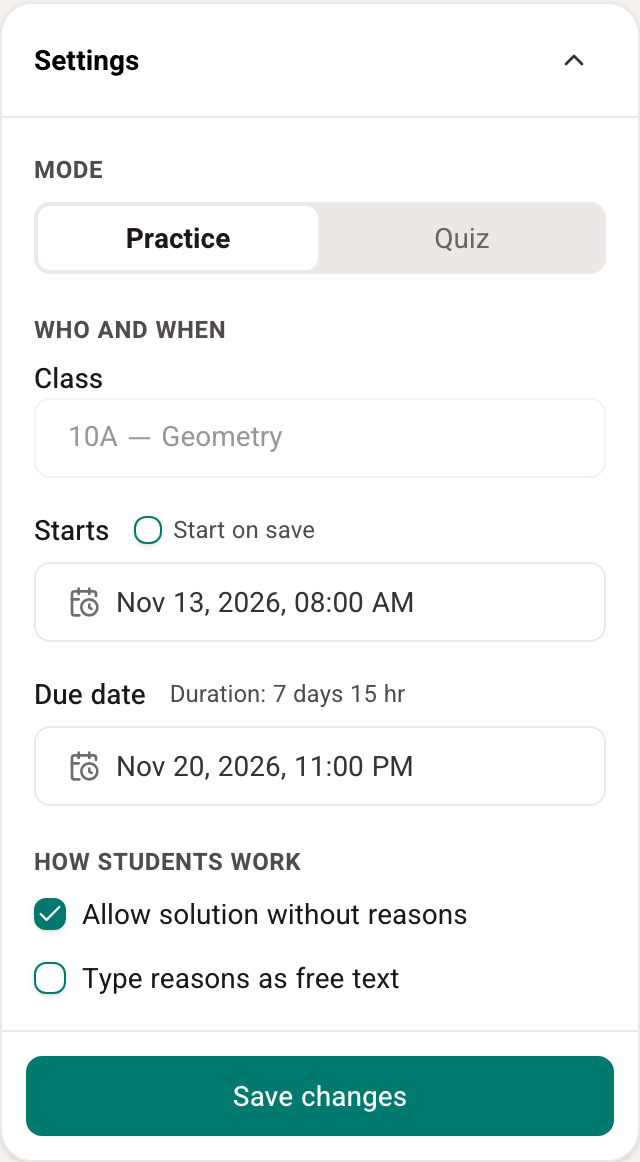
You choose these settings when you create the task, or later from Task settings in the task's ⋯ actions menu. More in Creating and managing tasks.
Type reasons as free text
In a task like this, instead of the Select reason... button, every step has a text field: Type the reason.... Students write the reason as they would in their notebook, for example "alternate angles between parallel lines". They can write in Hebrew, Arabic or English, and don't need the exact name of the theorem.
How the reason is checked
When students ask for a check, an AI system reads what they wrote in each step and matches it to one of the reasons in FullProof's list of reasons. From there the check runs exactly as in a proof where the reason was picked from the list: if the matched reason fits the step it is correct, and if not it counts as a wrong reason, with the same deduction as in the scoring rubric.
Each step's feedback shows the reason FullProof matched, for example Interpreted as: If two parallel lines are cut by a transversal, then the alternate interior angles are congruent. That way students can see whether they were understood the way they meant.
There are two cases where the reason is not checked as usual:
- No reason was recognized: if what was written matches no reason, the message is We couldn't match your explanation to a known reason.
- The reason is blocked in this question: if the matched reason is a theorem that may not be used in this question (for example the theorem the question asks you to prove), the message is This reason is not allowed for this problem.
In both cases the step loses 2 points for its reason, and the rest of the proof is checked as usual.
Good to know
- Reasons FullProof fills in by itself (transitivity, adding equations and simple definitions) are still filled in automatically in this mode. Students type a reason only in the other steps.
- Choose the setting before students start solving. A student who has already saved a solution with free-text reasons keeps typing reasons even if you turn the setting off.
- Privacy: only the text of the reason and the exercise details are sent to be checked — no student name and no other identifying details. Still, remind students not to write personal details in their reasons.
Allow solution without reasons
In a task like this, students can leave the reason empty in any step. A step without a reason loses no points, and the feedback shows students which reason fits. A reason students did write is checked as usual, and a wrong one loses points.
The proof opens in the Steps view, which suits writing without a reasons column. Students can still switch to the Table view.
This option suits, for example, a first encounter with FullProof, or practice whose aim is building the chain of statements rather than phrasing the reasons.